VMS vs NVR: When Does a Multi-Site Enterprise Need a Video Management System?
VMS vs NVR explained: what each does, when an NVR is enough, the signs a multi-site enterprise needs a VMS and how to move without replacing NVRs.
Key takeaways
- 01An NVR is a recorder for a fixed set of cameras at one location; a VMS is software that manages cameras, recorders, users and events across many locations.
- 02A single small site with one camera brand and a few users can run well on an NVR.
- 03Multiple sites, mixed camera brands, a central control room, many users or audit needs are the usual signs you need a VMS.
- 04You rarely have to rip out NVRs: a VMS can sit above them and take over central viewing, search and alarm handling in phases.
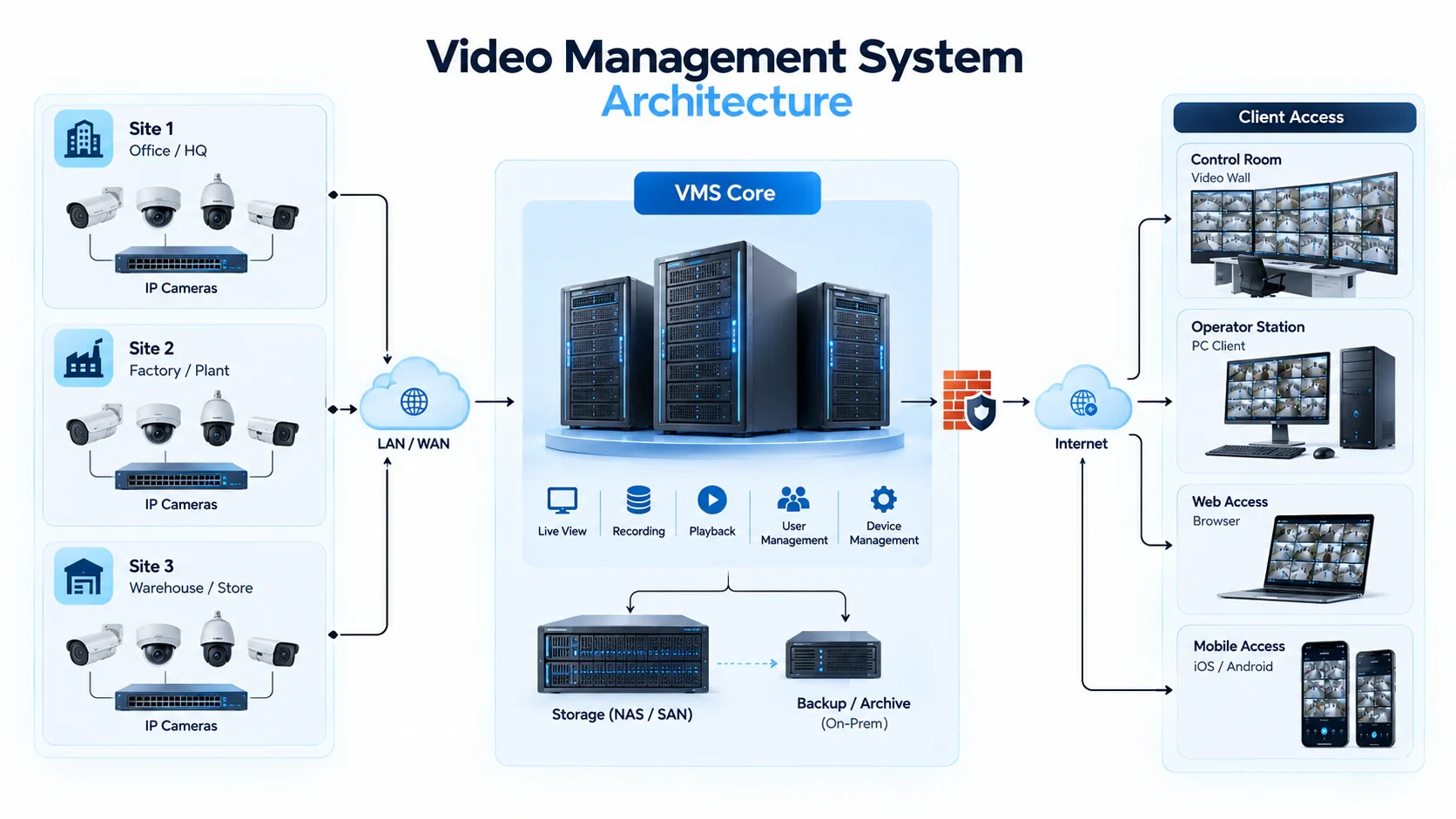
Short answer: An NVR (network video recorder) records and plays back a fixed set of cameras at one location, while a VMS (video management system) is software that brings many cameras, recorders, users and sites into one console with alarms, search and access control. A multi-site enterprise usually needs a VMS once it has several locations, mixed camera brands, a central control room or audit requirements, and it can often keep its NVRs while adding one.
Most camera estates start with NVRs. A site gets cameras and a recorder, someone checks footage when needed, and it works. The trouble starts when there are ten, fifty or a hundred such sites, each with its own recorder, login and way of doing things.
What is the difference between an NVR and a VMS?
An NVR is a recording device; a VMS is a management platform. The NVR stores video for the cameras plugged into it, while the VMS manages video, users and events across the whole estate.
| Aspect | NVR | VMS |
|---|---|---|
| What it is | A hardware recorder with built-in software | Software running on servers, appliances or the cloud |
| Scale | A fixed number of channels at one location | Many cameras, recorders and sites |
| Camera support | Best with the same brand; other brands vary | Multi-brand, usually through ONVIF, RTSP and vendor SDKs |
| Users | A few local accounts | Role-based access for many operators, managers and auditors |
| Alarms | Local notifications per recorder | A shared queue with acknowledgment and escalation |
| Search and evidence | Per-recorder playback and export | Search across sites, with export and audit trails |
| Integrations | Limited | Access control, analytics, ticketing and other systems |
The glossary entry on NVR vs DVR vs VMS adds the analog DVR to the comparison, and our VMS entry covers the term in more depth.
When is an NVR enough?
An NVR is enough when the estate is small, local and simple: one site, one camera brand, a handful of users and investigations done after the fact.
A single office, shop or small warehouse often fits this description. If nobody needs to watch several locations at once, footage is reviewed only occasionally and the person responsible sits on site, a good NVR is often the simplest and most economical answer.
When does a multi-site enterprise need a VMS?
When people need to see, search and act on video across locations from one place, with clear control over who can do what.
Typical signs:
- Several sites that a central team must monitor or investigate across
- Mixed camera and recorder brands, often from acquisitions or different installers
- A central or regional control room that needs one live wall and one alarm queue
- Many users with different scopes, such as site guards, regional managers and auditors
- Evidence and audit needs, where exports and access must be logged
- Integrations with access control, alarms or business systems
- Plans for AI analytics, which work best on a managed, central video layer
At that point, the cost of logging into dozens of recorders, chasing passwords and stitching together exports usually outweighs the cost of a VMS.
Do you have to replace your NVRs to move to a VMS?
Usually not. Many VMS platforms can connect to existing cameras and recorders, so NVRs can keep recording on site while the VMS handles central viewing, search and alarms.
A phased approach works well:
- 1Connect what exists. Add existing cameras and recorders to the VMS, site by site.
- 2Centralize the workflow. Move live monitoring, alarm handling and evidence export into the VMS console.
- 3Standardize policies. Apply common roles, retention rules and naming across sites.
- 4Retire recorders on your schedule. Replace NVRs when they reach end of life, not all at once.
The same logic applies to cameras: keep the ones that work, and replace only where coverage or image quality is not good enough. Our guide on adding AI to existing CCTV cameras covers the compatibility checks.
Where do AI analytics and camera health fit?
A VMS is the foundation; AI analytics and camera health monitoring are the layers that make a large estate manageable.
With AI video analytics, the system flags events such as perimeter intrusion or unauthorized area entry instead of relying on operators to spot them. With camera health monitoring, the system shows which cameras are offline or not recording, which matters more as the number of sites grows. Both work best when they share the same device list and alarm queue as the VMS.
Some organizations prefer a cloud-hosted model, often called VSaaS (video surveillance as a service). Others keep video on site and use a central console for management. The right choice depends on bandwidth, data policies and how much video must leave each site.
How do you choose a VMS?
Choose on fit with your estate and workflow, and test it on your own cameras.
- Does it support the camera and recorder brands you already own?
- Can it show all sites in one console, with role-based access per site?
- Does it have a shared alarm queue with acknowledgment, escalation and audit trails?
- How fast can an investigator find and export footage across sites?
- Does it work through limited or intermittent WAN links?
- Can it add AI analytics and camera health monitoring without separate systems?
- What does it need on site, and what runs centrally?
How does OrionAlerts approach VMS?
OrionAlerts includes an enterprise VMS as one of the five modules of its video intelligence platform.
It provides centralized live monitoring and playback, multi-site management, video search and evidence export, secure remote access, event and alarm management from one shared queue, and open integration with IP cameras and third-party systems. Supported IP cameras and recorders connect through ONVIF, RTSP and vendor SDKs, so existing equipment is brought onto the platform rather than replaced.
The VMS runs on Nebula OS together with AI video analytics, camera health monitoring, asset tracking and AMC management. For multi-site estates, each site can run its own Nebula OS node for video, recording and inference, while Orion Cloud provides the central command view across every location. See how multi-site video management applies to industries such as banking, retail, logistics and manufacturing.
FAQs
Is an NVR the same as a DVR?
No. A DVR records analog or HD-analog cameras, usually connected over coaxial cable, while an NVR records IP cameras over the network. A VMS can manage both, usually through the recorder or an encoder. Hybrid recorders that accept both analog and IP cameras are also common during migrations.
Can a VMS work with my existing NVRs?
Often, yes. Many VMS platforms connect to existing recorders and cameras, so you can centralize viewing and alarms first and replace recorders later. Check which recorder models and firmware versions are supported, whether playback and export work through the recorder, and how many streams each recorder can serve without affecting recording.
Do I need a VMS for a single site?
Not always. A single site with a few users and one camera brand can work well on an NVR. A VMS starts to pay off when there are many cameras, many users with different permissions, integrations with other systems, audit requirements or a control room that needs one alarm queue.
Is a VMS the same as video analytics?
No. A VMS manages, records and plays back video; video analytics detect events in it, such as an intrusion or a missing helmet. They can be bought separately, but platforms that combine the two let operators see an alert and the footage behind it in one place, without switching systems.
Keep reading
Related articles
VMS · 2 Jul 2026 · 7 min read
Alert Fatigue in CCTV Control Rooms: Causes, Costs and How to Fix It
Why more CCTV alerts can make sites less safe, what causes false alarms, and how AI prioritization, routing and camera health reduce alert fatigue.
AI Video Analytics · 22 Jun 2026 · 7 min read
What Is a Vision Intelligence Platform? Definition, Components and How to Evaluate One
What a vision intelligence platform is, how it differs from an NVR, a VMS and standalone video analytics, and a checklist for evaluating one.