Live monitoring & control
Video Management System (VMS) Software
Unify cameras, sites, and operators in one enterprise VMS for live monitoring, playback, and control.
Trusted by banks, retailers, public institutions and enterprises across India























Overview
What is a video management system (VMS)?
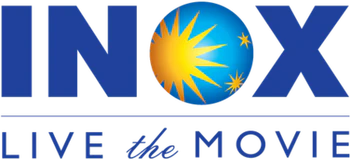
A video management system (VMS) is software that connects IP cameras and recorders so operators can watch live video, play back recordings, manage alarms and export evidence from one interface. OrionAlerts VMS runs as a native service of Nebula OS, so multi-site live view and playback sit on the same platform as AI alerts and camera health.
Unify every camera — one wall, one workflow.
OrionAlerts VMS replaces NVR-by-NVR logins with one console for every camera, recorder and site. Recording and retention are set per camera, zone or site, incidents are found on searchable timelines, and the cameras you already own connect over ONVIF, RTSP and vendor SDKs.
- Works with
- Existing IP cameras and recorders over ONVIF, RTSP and vendor SDKs
- Deploys as
- On-site Nebula OS node · multi-site with Orion Cloud · partner-managed
- Alerts via
- Dashboard, mobile app and email
Video stays on the on-site node. Only health, alert, configuration and operational metadata syncs to Orion Cloud. How Nebula OS works
Outcomes
What control rooms notice first with OrionAlerts VMS
Outcome 01 / 04
Faster incident awareness across locations
Live multi-cam view so operators spot issues sooner
How it works
How OrionAlerts VMS works
From connecting the cameras you already own to exporting evidence, in four steps.
- 01
Connect cameras and map sites
Bring existing IP cameras and recorders onto the platform over ONVIF, RTSP or vendor SDKs, and map them to sites and zones.
- 02
Define roles, zones and retention
Decide who sees which sites and cameras, and set recording and retention per camera, zone or site.
- 03
Monitor live video and handle alarms
Operators watch live walls across sites and acknowledge, escalate and clear alarms from one shared queue.
- 04
Search incidents and export evidence
Find footage on searchable incident timelines and export evidence for investigations and audits.
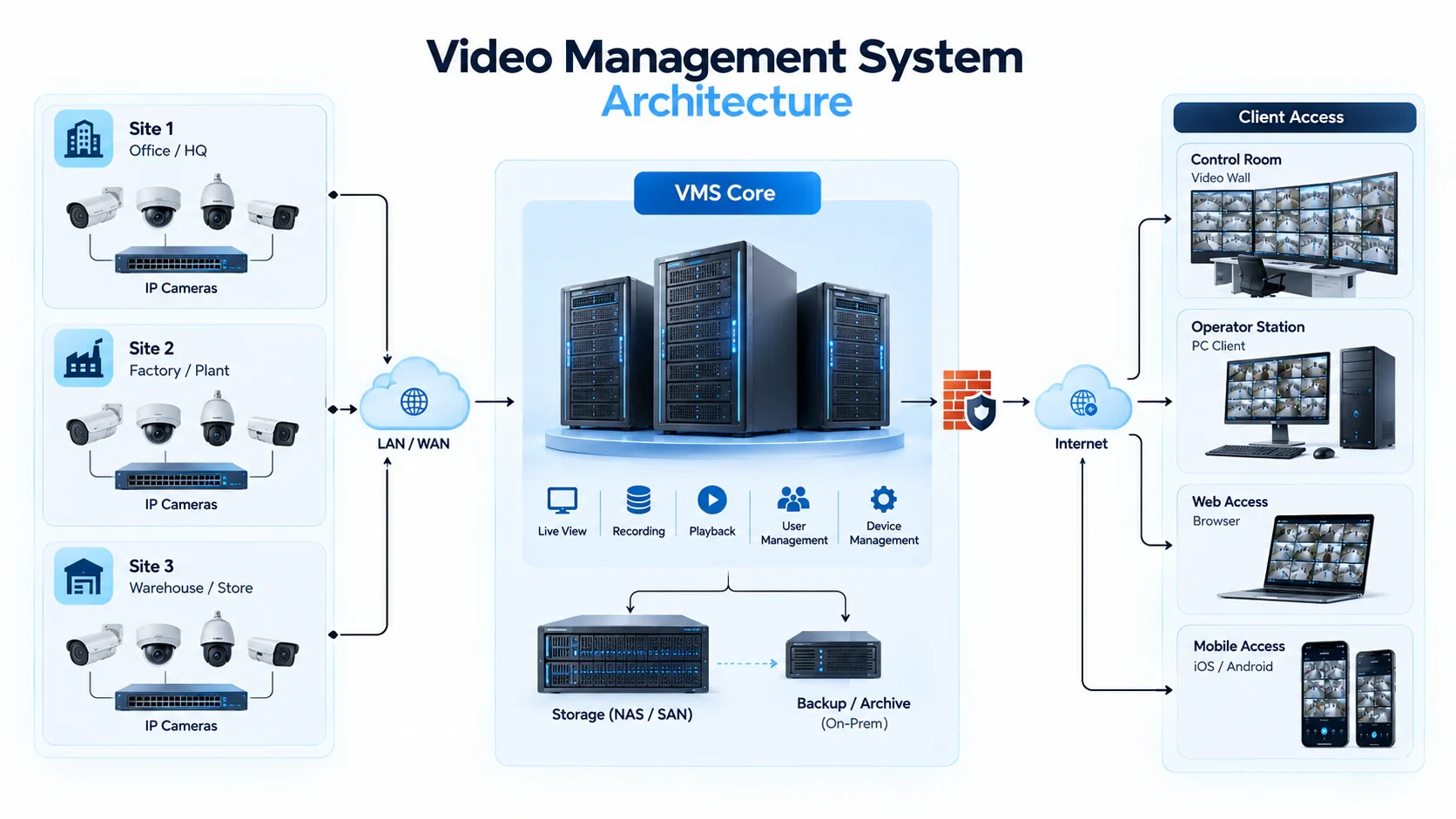
- 1. Camera ingest over ONVIF, RTSP and vendor SDKs →
- 2. Video and recording engines on the on-site Nebula OS node →
- 3. Recording and retention policies per camera, zone or site →
- 4. Operator console with role-based access and APIs
VMS capabilities
Enterprise video management system features
Bring cameras, sites, and operators into one video management system—so security teams monitor live video, investigate incidents faster, and run multi-site surveillance without fragmented NVR workflows.
01
Centralized Live Monitoring & Playback
View live camera streams and recorded footage from one unified operations interface—so control-room teams monitor events, review incidents, and coordinate response without switching between disconnected systems.
02
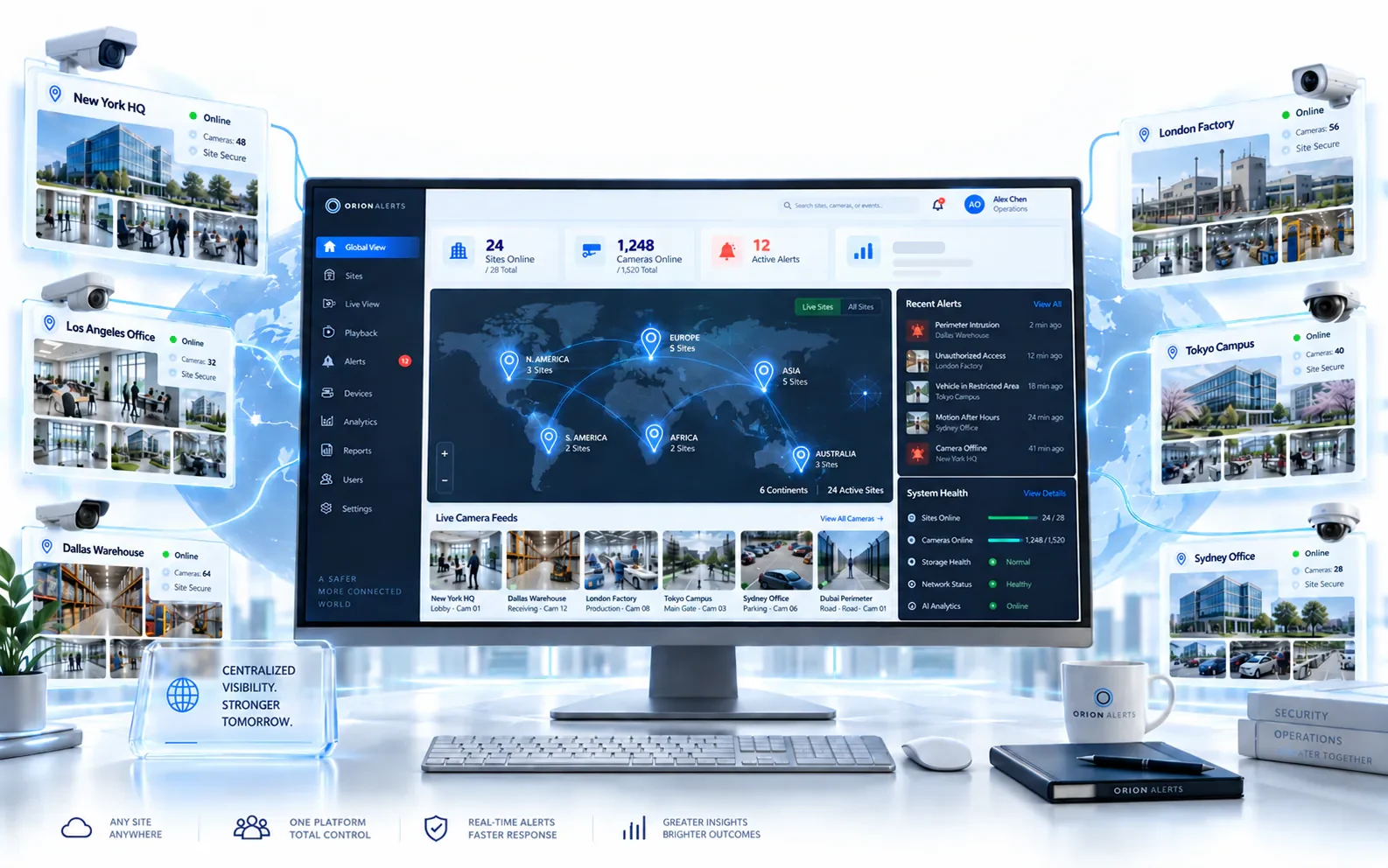
Multi-Site Surveillance Management
Oversee cameras, recorders, and sites across campuses and facilities from a single VMS platform, giving security leaders consistent visibility and control as the estate scales.
03
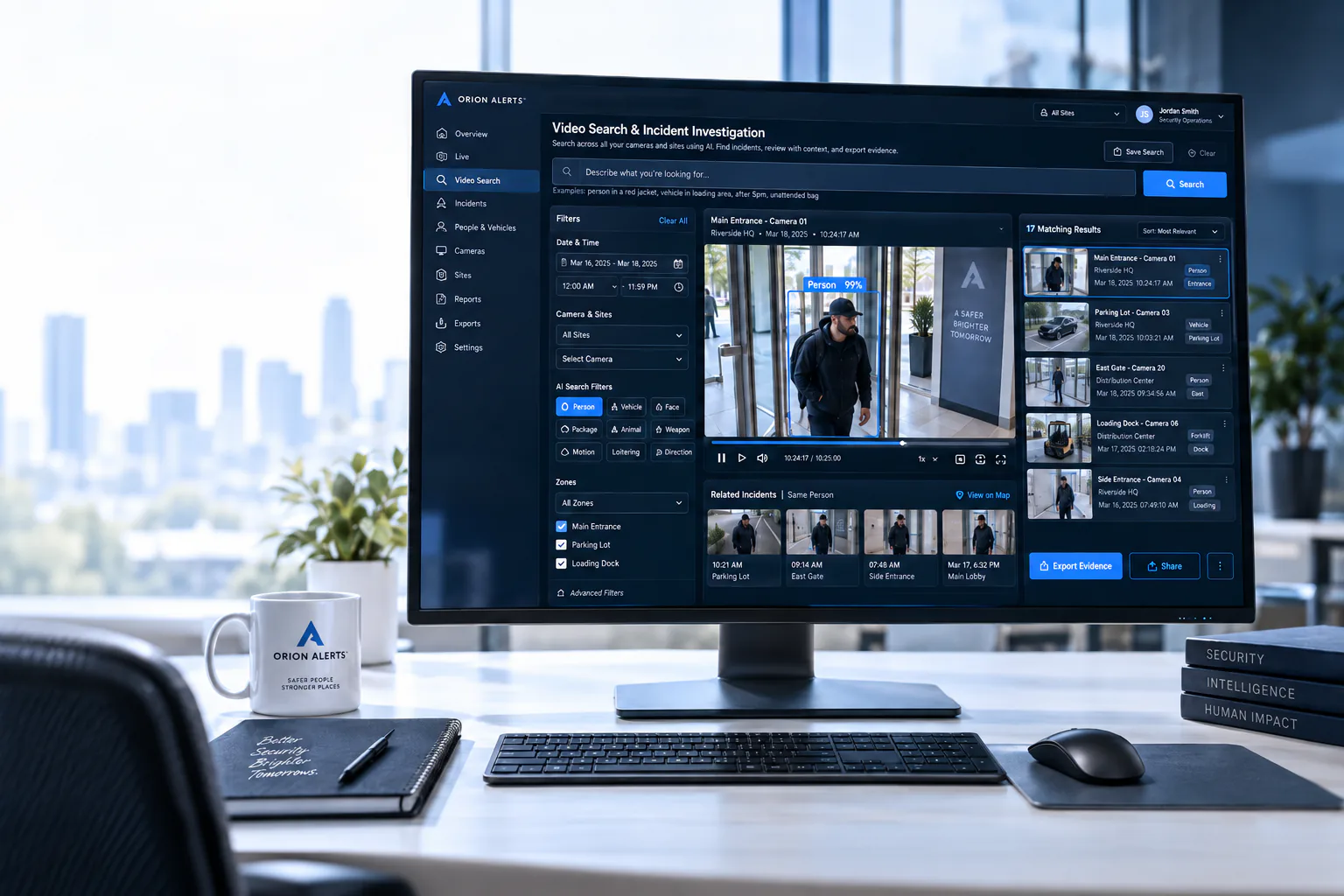
Video Search & Incident Investigation
Find relevant footage quickly with searchable video workflows that accelerate incident investigation, evidence export, and post-event review for security and compliance teams.
Outcome: evidence search without scrubbing footage, so investigations move from search to action sooner.
04
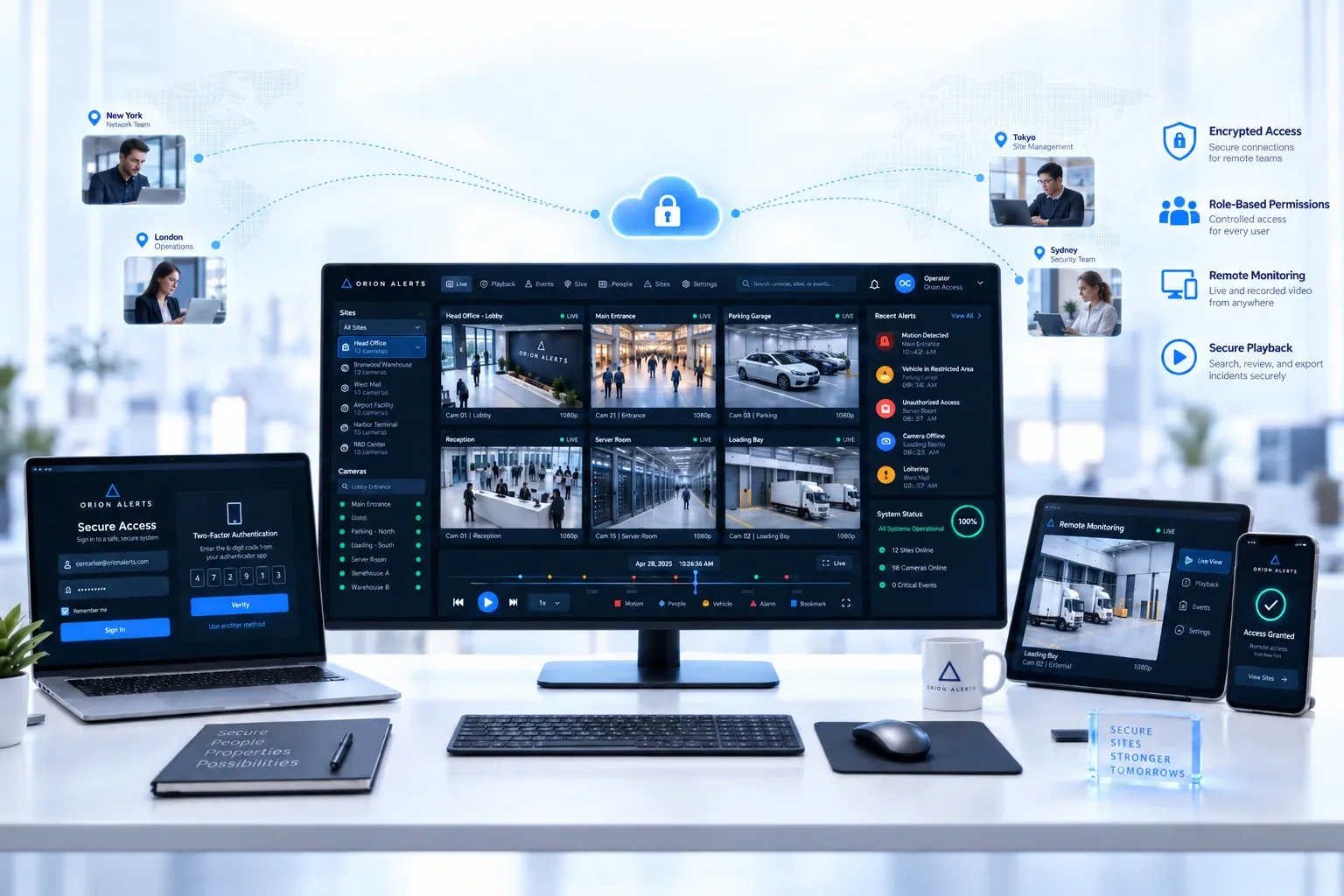
Secure Remote Access
Give authorized operators and managers secure remote access to live video, playback, and controls—without exposing the broader camera estate to unmanaged access risk.
05
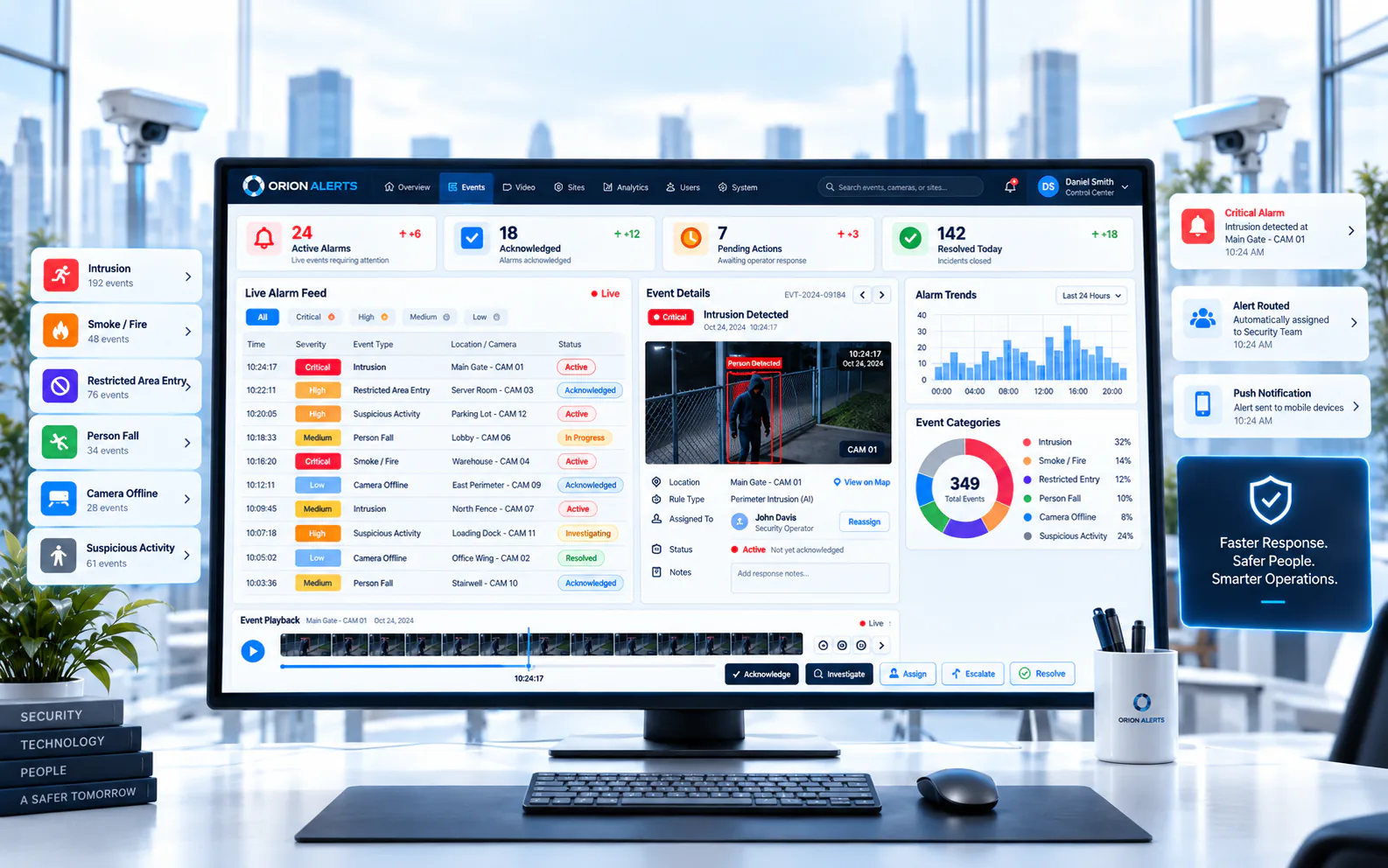
Event & Alarm Management
Centralize events and alarms so operators can acknowledge, escalate, and clear incidents from one shared queue with clearer ownership and faster on-floor response.
06
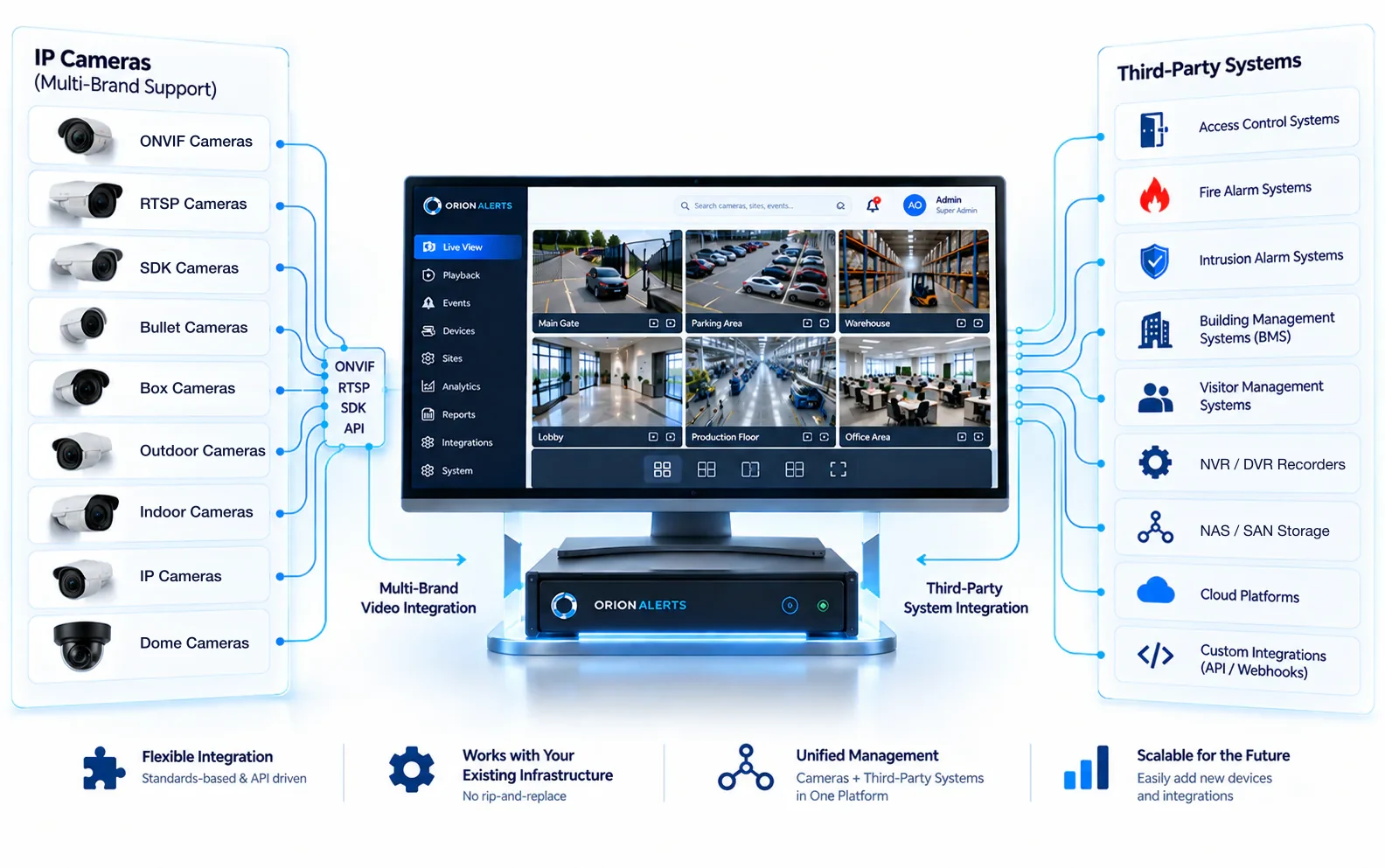
Open Integration with IP Cameras & Third-Party Systems
Connect IP cameras and third-party systems through an open architecture so organizations can expand coverage, protect existing investments, and avoid closed hardware lock-in.
Compare
VMS vs NVR: what's the difference?
The practical differences show up as soon as there is more than one recorder or site.
| Aspect | Typical NVR | OrionAlerts VMS |
|---|---|---|
| Scope | Records the cameras at one location | Manages cameras and recorders across every site from one console |
| Access | Separate login on each recorder | One console with role-based access by site, camera and zone |
| Alarms | Handled device by device | One shared queue to acknowledge, escalate and clear alarms |
| Investigation | Scrub footage recorder by recorder | Searchable incident timelines and evidence export |
| Camera choice | Often tied to the recorder's own ecosystem | Brand-neutral through ONVIF, RTSP and vendor SDKs |
| AI and camera health | Separate tools, if any | AI alerts and camera health monitoring on the same platform |
FAQs
Video management system (VMS) FAQs
Do I need to replace my cameras to use OrionAlerts VMS?
No. OrionAlerts connects supported IP cameras and recorders through ONVIF, RTSP and vendor SDKs, so the cameras you already own are brought onto the platform rather than replaced.
What is the difference between a VMS and an NVR?
An NVR records cameras at one location. A VMS manages many cameras and recorders across sites from one console, with shared user roles, alarm handling, search and evidence export.
Does video leave my site?
Not in the standard deployment. Video is recorded and stored on the on-site Nebula OS node, and Orion Cloud synchronizes only health status, alerts, configuration and operational metadata, so you get a central view without uploading raw video.
Can one VMS manage multiple sites?
Yes. Each site runs its own Nebula OS node for video and recording, and Orion Cloud provides one command view across every location. Role-based access means operators, managers and auditors each see the sites and cameras in their scope.
Can I add AI video analytics to the same cameras later?
Yes. AI video analytics is another module of the same platform. The AI runtime reads frames from the same video engine that records your cameras, so detections can be switched on for selected cameras without a separate analytics appliance.
Industries that use OrionAlerts VMS
Further reading
Explore other solutions: Asset Tracking · AMC Management · Health Monitoring · AI Vision · Compare all solutions
See OrionAlerts VMS on your own cameras
Book a demo for a guided walkthrough tailored to your sites and operators.