Surveillance Asset Management: Building a Live Camera and NVR Register Across Sites
Build a live register of cameras, NVRs and network devices across sites: what to record, custody, warranty, lifecycle and keeping it in sync.
Key takeaways
- 01A surveillance asset register is one record of every camera, recorder, server and network device, with its location, owner, warranty, contract and service history.
- 02Spreadsheet registers drift because the estate changes faster than anyone updates them, and nothing checks the list against the devices on the network.
- 03Connect the register to live device data so offline, replaced or moved devices show up as changes, not surprises at audit time.
- 04Link each asset to its warranty and AMC so a failure can be raised against the right vendor and contract.
Short answer: Surveillance asset management means keeping one live register of every camera, NVR, server, switch and storage device across your sites, with each asset's identity, location, owner, warranty, maintenance contract and history. The register stays accurate only when it is connected to the devices themselves, so that status changes, replacements and moves show up automatically.
Ask a multi-site organization how many cameras it has, and the answer often depends on who you ask. Procurement has purchase orders, the installer has a handover sheet, the AMC vendor has its own list and the security team has whatever the NVRs show. A proper register brings these sources together and keeps them true.
What is a surveillance asset register?
It is the single, authoritative list of the physical devices that make up your video estate, together with the facts needed to operate, maintain and replace them. It covers more than cameras: NVRs and DVRs, servers, storage, network switches, PoE injectors, encoders, UPS units and monitors all affect whether video is captured and available.
A good register answers everyday questions quickly. Which cameras are at this branch? Who is responsible for them? Is this NVR still under warranty? When was this camera last serviced, and how often has it failed?
What should you record for each asset?
Use a consistent set of fields for every device type. The exact list will vary, but these cover most needs:
| Field | Why it matters |
|---|---|
| Asset ID and name | A stable reference that survives replacements and moves |
| Device type, make and model | Drives compatibility, spares and firmware decisions |
| Serial number and MAC address | Ties the record to one physical unit for warranty and audits |
| Site, building, floor and position | Lets a technician find it and an investigator know what it covers |
| Connected recorder and channel | Links a camera to where its video is stored |
| IP address and firmware version | Supports troubleshooting and update planning |
| Owner and custodian | Names who is accountable, centrally and at the site |
| Purchase date, supplier and invoice | Supports warranty claims and budgeting |
| Warranty start and end dates | Shows whether a fault is a claim or a paid repair |
| AMC contract and vendor | Shows who must respond, and under which terms |
| Status and lifecycle stage | In store, installed, in repair, retired or disposed |
| Service history | Every fault, visit, replaced part and outcome |
Keep the list short enough that people will actually fill it in.
Who is accountable for each camera?
Custody is the part spreadsheets most often get wrong. A register should name two parties for each asset: the owner, usually a site or department accountable for the device, and the custodian, the person or team who looks after it day to day.
Custody changes when staff move, sites are reorganized or a device is sent for repair. Record each change with a date and a reason. When a device leaves a site for repair or replacement, the register should show where it went, who has it and when it is due back, so that a missing camera is never simply missing.
How should warranty and AMC be tracked?
Every asset should point to its warranty terms and, where relevant, its annual maintenance contract (AMC). That link is what turns a fault into an action. If a camera fails under warranty, the claim goes to the supplier; if it is covered by an AMC, a service request goes to the contracted vendor under the agreed terms.
Track warranty and contract end dates in one place, and set reminders well ahead of expiry so renewals are a decision rather than a lapse. Our CCTV AMC management checklist covers contract terms, preventive maintenance and vendor scorecards in more detail.
How do you manage the asset lifecycle?
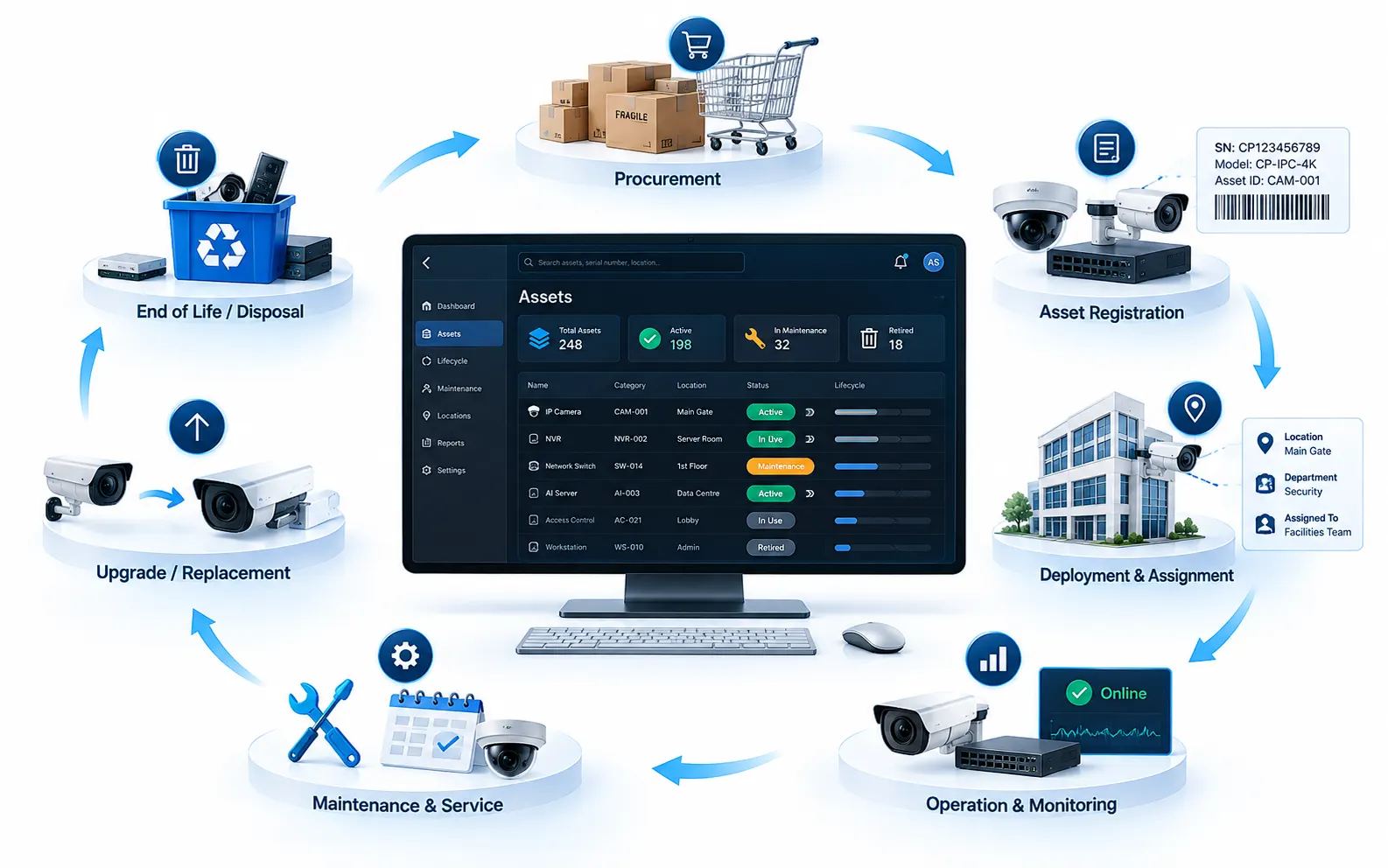
Each device moves through a lifecycle: procurement, registration, deployment, operation and maintenance, upgrade or replacement, and finally retirement and disposal. Recording each stage gives you a history you can plan with.
- Procurement and registration. Create the record when the device arrives, not when someone gets around to it, and capture the serial number at that point.
- Deployment. Record the site, position, recorder channel and custodian when the device is installed.
- Operation and maintenance. Log every fault, visit and part replacement against the asset.
- Replacement. When a camera is swapped, retire the old record and link the new one to the same position, so the history is kept.
- Retirement and disposal. Record how and when the device left the estate, including how any stored footage or data was handled.
Over time, lifecycle data shows which models fail most often and which devices are nearing end of life, which makes refresh budgets easier to plan.
Why do spreadsheet registers drift?
Spreadsheets work for a while, then drift for predictable reasons:
- The estate changes faster than the file. Cameras are added, moved and replaced during routine work, and nobody updates the sheet afterward.
- There are several copies. Each site, vendor and team keeps its own version, and the versions disagree.
- Nothing checks the list against reality. A spreadsheet cannot tell you that a camera it lists has been offline for a week, or was replaced by a different model.
- History is lost. Overwriting a cell erases what was there, so the custody and service trail disappears.
- Ownership is unclear. When everyone can edit the file, nobody is responsible for it being right.
The result is a register that is accurate on the day of an audit and wrong soon after.
How do you keep the register in sync with live devices?
Stop relying on people to notice changes, and let the devices report them. When the register is connected to the system that already talks to your cameras and recorders, it can reflect status, identity and firmware directly.
In practice, that means:
- 1Reconcile the register against the devices actually found on the network and recorders, so unknown or missing devices stand out.
- 2Link health status to each asset, so an offline camera or a recorder that has stopped recording appears on the asset record. See how camera health monitoring works.
- 3Treat replacements as events, so a new serial number at a known position updates the record and keeps its history.
- 4Raise service requests from the asset, so maintenance is tied to the right contract and vendor.
- 5Review exceptions on a schedule, such as devices with no owner, an expired warranty or no recent health data.
What should your register checklist cover?
Use this checklist to judge whether your register is ready to run a multi-site estate.
| Check | What good looks like |
|---|---|
| Coverage | Every camera, recorder, server, switch and storage device in the video path is listed |
| Identity | Each record has a serial number, model and stable asset ID |
| Location | Site, building and position are recorded for every device |
| Custody | Each asset has a named owner and custodian, with a change log |
| Coverage terms | Warranty and AMC are linked to each asset, with expiry reminders |
| Live status | Health and recording status appear on the asset record |
| Lifecycle | Stage and service history are kept, not overwritten |
| Single source | One register shared by security, facilities, IT and vendors |
How does OrionAlerts handle surveillance asset management?
OrionAlerts includes Asset Tracking and AMC Management as modules of one platform, alongside the VMS, AI video analytics and camera health monitoring, all running on Nebula OS. Asset Tracking keeps one register of cameras, recorders, servers and network devices with location, custodian, serial number, warranty and documents. Teams find any asset by serial number, QR code or barcode, every transfer is logged, and the custody history can be exported for audits. AMC Management tracks maintenance contracts, warranties, preventive maintenance, service requests, vendor performance and SLAs.
Every device connected to the platform through ONVIF, RTSP or vendor SDKs is also an asset record, so the register stays in step with the live estate instead of drifting like a spreadsheet. Because the modules share that record, an alert, an outage and a service ticket all point to the same device, and a failing camera can raise a service request against the right vendor and contract. For multi-site organizations, Orion Cloud gives one central view of alerts, camera health, assets and maintenance across every location.
FAQs
What is the difference between asset tracking and camera health monitoring?
Asset tracking records what each device is, where it is, who owns it and its warranty and service history. Health monitoring checks whether the device is working right now. They are most useful when they share one record, so a fault appears on the asset it affects.
Should NVRs and network switches be in the same register as cameras?
Yes. A camera is only useful if its recorder, switch, storage and power are working, so the register should cover every device in the video path and show how they connect. Recording which recorder channel and switch a camera depends on also speeds up fault-finding, because a technician can see at once what else an outage affects.
How often should a surveillance asset register be audited?
Set a regular cycle that suits your estate, and audit after major changes such as site openings, refits or vendor handovers. A register linked to live device data needs fewer manual audits, because missing and changed devices surface on their own.
Can an existing spreadsheet be turned into a live register?
Usually, yes. Clean it first: remove duplicates, agree on the field list and fill gaps such as serial numbers and locations. Then import it and reconcile it against the devices actually connected at each site, so devices with no record, and records with no device, stand out from the start.
Keep reading
Related articles
Asset & AMC · 26 Oct 2026 · 7 min read
CCTV AMC Management Checklist: SLAs, Preventive Maintenance and Vendor Scorecards
A practical CCTV AMC checklist: what the contract should cover, how to set SLAs, what preventive maintenance includes and how to score vendors.
Camera Health · 26 Oct 2026 · 7 min read
CCTV Camera Health Monitoring: Detect Offline Cameras and Recording Gaps Before an Incident
How CCTV camera health monitoring finds offline cameras, blocked views and recording gaps before an incident, and what checks and metrics to use.