Edge vs Cloud Video Analytics: Where Should AI Inference Run?
Edge vs cloud video analytics compared: bandwidth, alert latency, privacy, WAN outages and cost structure, plus when a hybrid model makes sense.
Key takeaways
- 01Edge video analytics runs AI models on hardware at the site; cloud video analytics sends video or frames to a provider's data center for analysis.
- 02Edge suits sites with many cameras, limited upload bandwidth, strict data policies or unreliable internet links.
- 03Cloud suits small, well-connected sites that cannot host or maintain compute hardware.
- 04Most multi-site organizations land on a hybrid: inference at each site, with alerts, health and configuration managed centrally.
Short answer: Run AI inference at the edge, on hardware at the site, when you have many cameras, limited or costly upload bandwidth, a policy that video must stay on site, or alerts that must keep working during internet outages. Cloud inference makes sense for small, well-connected sites that cannot host any compute hardware. Many multi-site organizations combine the two: inference on site, management and oversight in the cloud.
Where AI inference runs sounds like an infrastructure detail, but it shapes most of a video analytics deployment: how much bandwidth each site needs, how quickly alerts arrive, who holds the video, what happens when the internet drops and how costs grow as you add cameras. This guide walks through each factor in plain terms.
What is the difference between edge and cloud video analytics?
The difference is where the AI model looks at the video. With edge video analytics, the model runs on a server, appliance or camera at the site. With cloud video analytics, video, clips or frames travel over the internet to a provider's data center, where the model runs.
In both cases the cameras can be the same. What changes is the path video takes before it is analyzed, and with it the network, privacy and resilience profile of the whole system. Our glossary entry on edge AI video analytics covers the term in more depth, and cloud-hosted surveillance more broadly is often called VSaaS (video surveillance as a service).
How do edge and cloud analytics compare?
The table below summarizes the trade-offs. Neither column is right for every site; the point is to see which constraints matter most for yours.
| Factor | Edge (on-site) analytics | Cloud analytics |
|---|---|---|
| Where inference runs | On a server or appliance at the site, often GPU-accelerated | In the provider's data centers |
| Upload bandwidth | Low; only events and metadata need to leave the site | High; video or frames must be uploaded for analysis |
| Alert latency | Local; no internet round trip before detection | Depends on upload speed and the round trip to the provider |
| Privacy and data residency | Video stays inside the site network | Video leaves the site and is processed by the provider |
| Internet outage | Detection and local alerting continue | Analysis stops or degrades until the link returns |
| On-site hardware | A compute node sized to cameras and detections | Minimal; cameras and possibly a gateway |
| Cost structure | Upfront hardware, plus software and support | Ongoing subscription and bandwidth that grow with cameras |
| Multi-site oversight | Needs a central layer to collect events | Central by design |
For a side-by-side view with guidance on when to choose each, see our on-prem vs cloud video analytics comparison.
Why does bandwidth matter so much?
Video is heavy, and AI needs a steady supply of it. A detection model watching for intrusion or PPE compliance has to see frames continuously, not only when someone remembers to look. For cloud inference, that means a constant upload from every analyzed camera, at a quality high enough for the model to work.
Many sites have far more download than upload capacity, and their links are shared with billing, ERP, voice and other business traffic. Adding a continuous stream from each camera can saturate the link, or force resolution and frame rate down to a level that hurts detection. Edge analytics avoids the problem: video travels only across the local network to the on-site node, and what leaves the site is a small stream of alerts, snapshots and metadata.
How does latency affect alerts?
For some use cases a short delay does not matter. For others, such as a person entering a restricted zone near moving machinery or someone climbing a perimeter fence at night, the value of an alert drops with every second.
Edge inference takes the internet out of the detection path. Frames are analyzed on the local network and the alert is raised on site, so latency depends mainly on the model and the capacity of the node. With cloud inference, every detection also depends on upload speed, network congestion and the provider's processing queue. Both can be fast in good conditions; the difference shows when conditions are not good.
What about privacy and data residency?
This is often the deciding factor. With edge analytics, video stays inside the site network, and only the information needed to act on an event leaves it. With cloud analytics, video leaves the site and is processed by the provider, which raises questions your security, legal and compliance teams will want answered:
- Where, physically, is video stored and processed, and in which country?
- Who at the provider can access it, and is that access logged?
- How long is video retained, and how is it deleted?
- Is customer video used to train or improve the provider's models?
None of these questions rules the cloud out, but each needs a clear, written answer. If your policy is simply that video must not leave the premises, edge inference is the straightforward way to meet it.
What happens when the internet goes down?
WAN links fail, get congested or are cut during maintenance, and remote sites such as warehouses, plants, branches and towers often have the least reliable connectivity. With cloud inference, an outage means analysis stops or degrades until the link returns. With edge inference, detection and local alerting carry on, and events can be synchronized to the central system once the connection is back.
Ask any vendor exactly what keeps working during a WAN outage: recording, detection, local alerts, and how events are reconciled afterward.
How do the costs compare?
Without quoting numbers, the two models differ in the shape of their costs rather than simply in size.
- Edge has an upfront hardware component, because each site needs a node with enough compute, usually GPU capacity, for its cameras and detections. Software, support and maintenance sit on top. Adding many cameras at a site may mean adding node capacity.
- Cloud has little upfront hardware but ongoing subscription fees that usually scale per camera or per stream, plus the cost of the upload bandwidth the analytics consume.
The comparison that matters is total cost over the life of the deployment, including bandwidth upgrades, hardware refresh, support and the operational cost of missed or late alerts. With many cameras per site, edge tends to be easier to scale; with a handful of cameras at a well-connected site, cloud can be simpler.
When does a hybrid model make sense?
For most multi-site organizations, the realistic answer is not edge or cloud but both, each doing the job it suits.
In a hybrid model, inference and recording run at each site, close to the cameras, while a central cloud layer handles what benefits from being central: one view of every site, alert review, camera health, configuration, user management and reporting. Video stays where it is captured; metadata moves.
This pattern keeps the bandwidth, latency, privacy and resilience benefits of the edge, while giving head office or a regional control room the oversight that cloud systems are known for. When evaluating a hybrid platform, check that both layers behave as one system, so that a configuration change, an alert and a health issue all refer to the same camera.
Where does OrionAlerts fit?
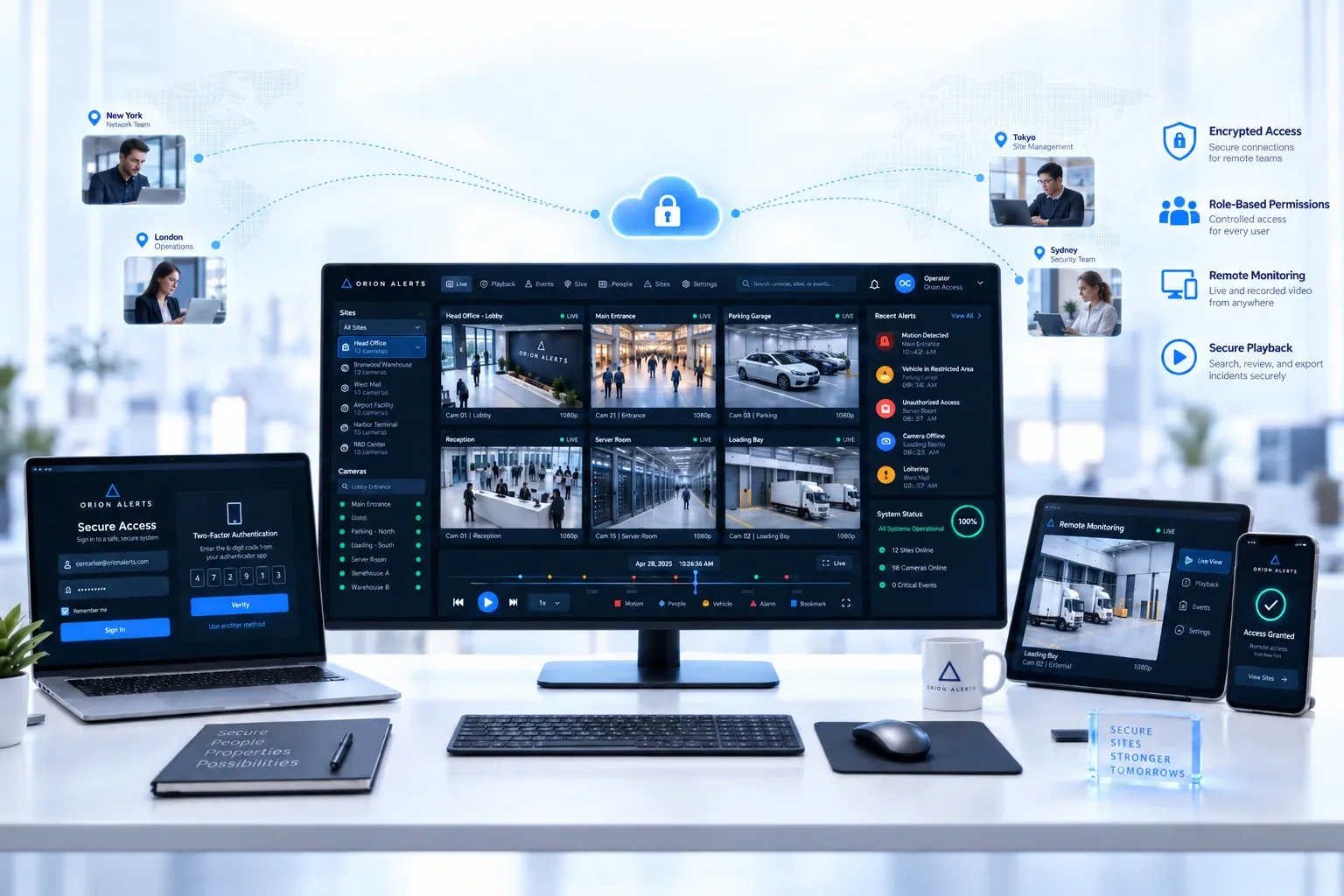
OrionAlerts runs AI video analytics at the edge. In the standard deployment, an on-site Nebula OS node runs video, recording and AI inference inside your network. GPU acceleration is used where AI analytics are enabled, and the node is sized to the channel count and the detections running. Cameras connect through ONVIF, RTSP and vendor SDKs, so the cameras you already own can be used.
For multi-site estates, each site runs its own node, and Orion Cloud provides the central management layer. It synchronizes health, alerts, configuration and operational metadata, so teams get one view across every location without uploading raw video. Partners can also deploy and manage nodes on behalf of their clients. Alerts reach operators through the dashboard, mobile app and email. Because recording and detection run on site, they do not depend on a fast internet link, and the on-site deployment is built to work through constrained or intermittent WAN links.
FAQs
Is edge video analytics more secure than cloud analytics?
Not automatically, but it removes a major exposure. Edge analytics keeps video inside the site network, so footage is not sent over the internet or held by an outside provider. Overall security still depends on how the on-site systems and any central management layer are configured, patched, access-controlled and monitored.
Can I use edge analytics with my existing cameras?
Usually, yes. Most edge platforms discover and configure IP cameras through ONVIF and pull their video over RTSP, and some also use vendor SDKs. Compatibility should still be confirmed model by model, including older cameras and recorders. Our guide to adding AI to existing CCTV cameras covers the checks.
Does edge video analytics need a GPU?
Usually, yes. Running detection models continuously on many camera streams relies on hardware acceleration, typically a GPU in the on-site server or appliance. The right size depends on how many cameras are analyzed, their resolution and frame rate, and which detections run on each, so ask vendors to size the node for your sites.
Can edge analytics still be managed centrally?
Yes. In a hybrid design, each site runs inference locally, while a central layer collects alerts, health status and configuration from every site. Head office or a regional control room gets one view of the whole estate, and settings can be managed centrally, without moving raw video off site.
Keep reading
Related articles
AI Video Analytics · 26 Oct 2026 · 9 min read
AI Video Analytics Buyer's Guide: How to Evaluate Vendors
How to evaluate AI video analytics vendors: existing-camera support, edge or cloud inference, data residency, multi-site control, pilots and support.
AI Video Analytics · 26 Oct 2026 · 8 min read
How to Add AI to Existing CCTV Cameras Without Replacing Them
Add AI video analytics to the CCTV cameras you already own: compatibility checks, ONVIF and RTSP, edge vs cloud processing and a pilot-first rollout.